AI Exam Paper Generator (RAG)
Turns lecture slides into structured exam papers with FAISS retrieval and Llama 3.1.
An end-to-end retrieval-augmented generation pipeline: PDF ingestion with PyMuPDF, chunking, sentence-transformer embeddings, FAISS vector search and Groq-hosted Llama 3.1 for question generation. It produces MCQ, true/false, short answer, fill-in-the-blank and descriptive questions with configurable difficulty, and validates every generated item against a schema.
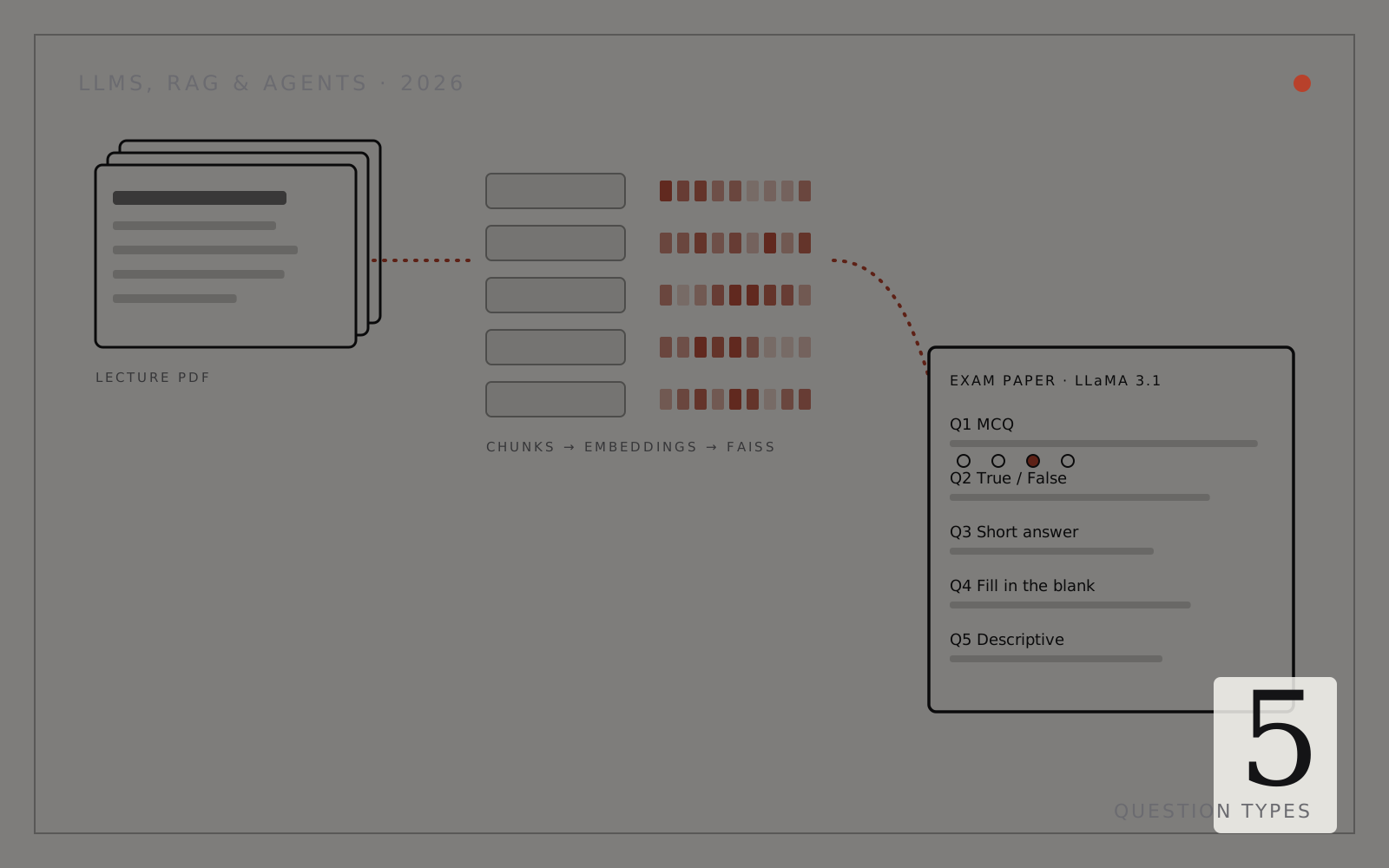
README · rendered from GitHub







Table of Contents
- Overview
- Pipeline Architecture
- Features
- Tech Stack
- Project Structure
- Quick Start
- Configuration
- Usage
- Evaluation
- Results
- Diagrams
- Authors
- License
Overview
This project is a CS-405 Deep Learning capstone built at SEECS, NUST. It implements an end-to-end AI-powered exam paper generator that takes any digitally-typed PDF (lecture slides, textbooks, research papers) as input and automatically produces a fully formatted, structured exam paper, complete with an answer key, without any model training.
The system leverages Retrieval-Augmented Generation (RAG):
- A PDF is parsed and split into overlapping text chunks.
- Each chunk is encoded into a 384-dimensional dense vector using
all-MiniLM-L6-v2. - Vectors are indexed in a FAISS store for fast cosine-similarity retrieval.
- For each question type, the most semantically relevant chunks are retrieved.
- Retrieved context is sent to Groq's LLaMA-3.1-8b-instant with a structured prompt.
- Questions are validated, marks are enforced, and the paper is exported as a PDF.
A TF-IDF baseline (lexical retrieval) is also generated in parallel for comparison, and both systems are evaluated using ROUGE-L and Flesch-Kincaid readability scores.
Pipeline Architecture
PDF Document
    |
    v
+---------------------+
|  PyMuPDF Extractor  |  <- Text extraction (no OCR, skips image-only pages)
+---------------------+
    |
    v
+---------------------+
|  LangChain Chunker  |  <- RecursiveCharacterTextSplitter (500 chars, 50 overlap)
+---------------------+
    |
    +----------------------------------+
    v                                  v
+------------------+         +----------------------+
|  FAISS Index     |         |  TF-IDF Vectorizer   |
|  (all-MiniLM-L6) |         |  (scikit-learn)      |
|  Dense / Cosine  |         |  Sparse / Lexical    |
+------------------+         +----------------------+
    |   RAG Retrieval                   |  Baseline Retrieval
    v                                   v
+-----------------------------------------------------+
|         Groq LLaMA-3.1-8b-instant                   |
|  Structured Prompt -> JSON Questions -> Validation   |
+-----------------------------------------------------+
    |
    v
+---------------------+
|   ReportLab PDF     |  <- Formatted exam paper + detached answer key
+---------------------+
    |
    v
  exam_paper_RAG_<difficulty>.pdf
Pipeline Flowchart
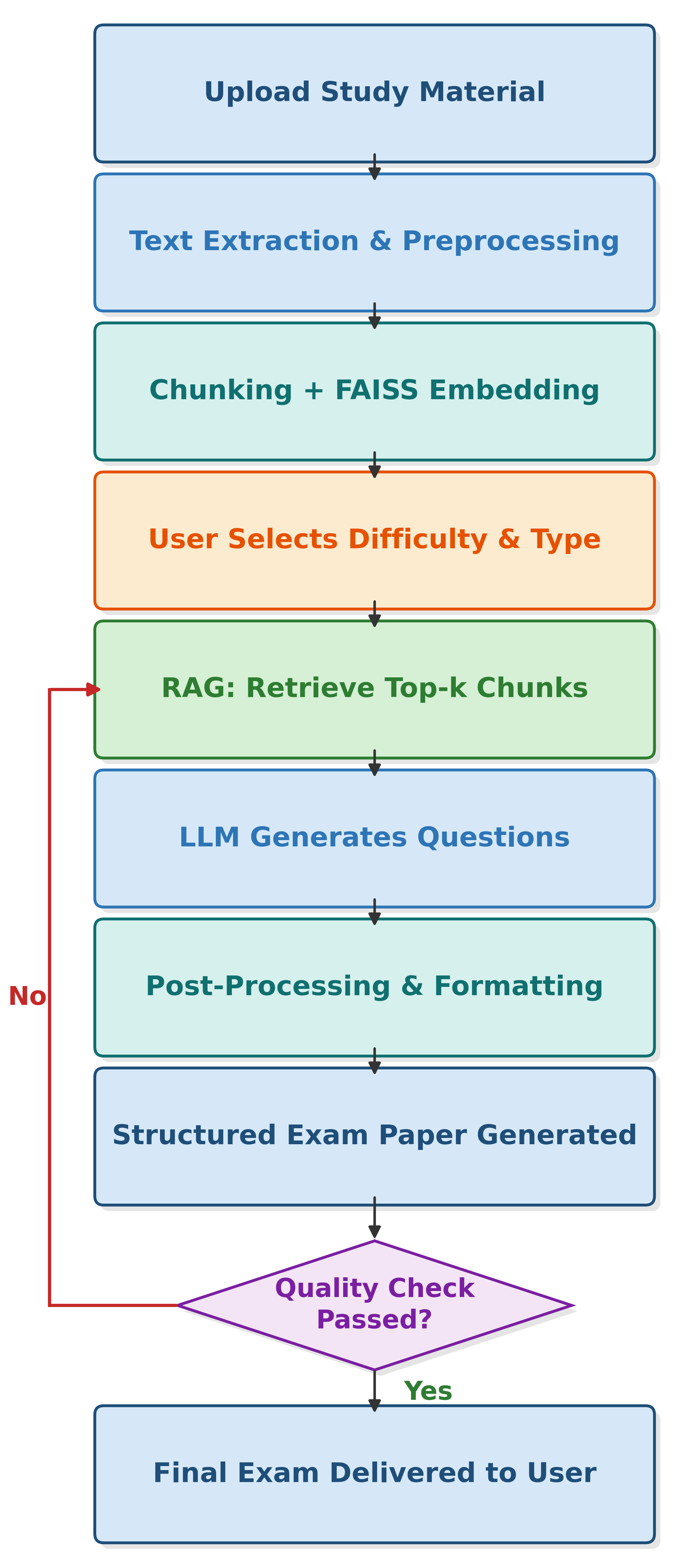
System Architecture
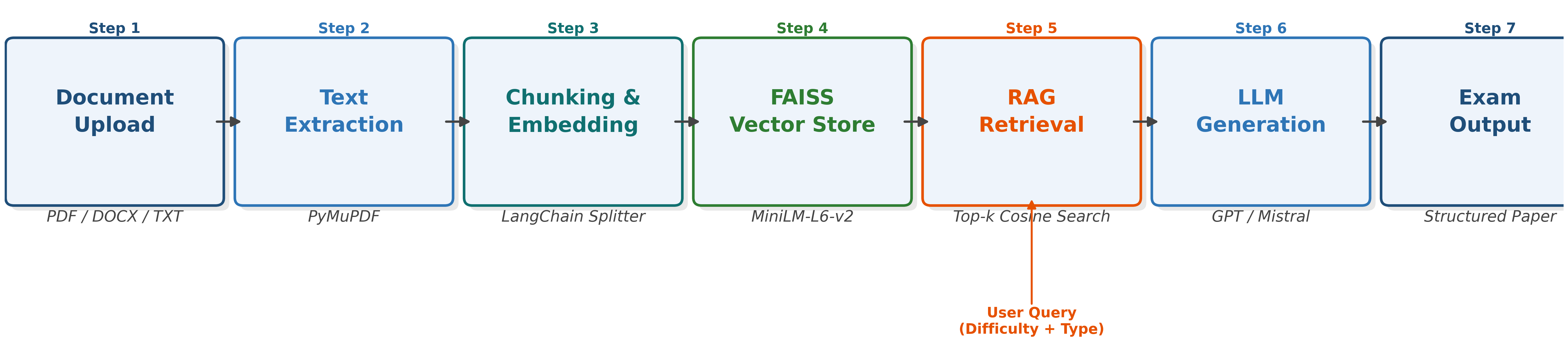
Features
| Feature | Detail |
|---|---|
| PDF Input | Any digitally-typed PDF (slides, textbooks, papers) |
| Semantic Retrieval | FAISS dense vector search (cosine similarity) |
| LLM Generation | Groq LLaMA-3.1-8b-instant (free API, fast inference) |
| 5 Question Types | MCQ, True/False, Short Answer, Fill-in-the-Blank, Descriptive |
| 3 Difficulty Levels | Normal (Bloom's L1-2), Difficult (L3-4), Nightmare (L5-6) |
| Output Validation | Auto-retry on malformed responses, marks enforced |
| Baseline Comparison | TF-IDF retriever for RAG vs. lexical evaluation |
| Evaluation Metrics | ROUGE-L, Flesch-Kincaid Grade Level |
| PDF Export | Professional ReportLab PDF with answer key on separate page |
| No Training | Pure inference, no GPU required |
Tech Stack
| Layer | Technology |
|---|---|
| Language | Python 3.10 |
| PDF Extraction | PyMuPDF (fitz) |
| Text Chunking | LangChain RecursiveCharacterTextSplitter |
| Embeddings | sentence-transformers/all-MiniLM-L6-v2 (384-dim) |
| Vector Store | FAISS IndexFlatIP (cosine similarity via L2 normalization) |
| Baseline Retriever | scikit-learn TfidfVectorizer (unigrams + bigrams) |
| LLM | Groq API - llama-3.1-8b-instant |
| PDF Generation | ReportLab |
| Evaluation | rouge-score, textstat (Flesch-Kincaid) |
| Platform | Kaggle Notebooks (CPU, no GPU needed) |
Project Structure
AI-Based-Exam-Paper-Generator-using-RAG/
|
+-- src/                            # Source code
|   +-- ai-based-exam-paper-generator-using-rag.ipynb  # Main pipeline notebook
|   +-- dl-project-part-1.ipynb                        # EDA and preprocessing notebook
|
+-- dataset/                        # Input PDF lecture slides (21 files)
|   +-- 1 Introduction.pdf
|   +-- 2 Basics of Multithreading.pdf
|   +-- ... (21 total)
|
+-- output/                         # Generated exam papers
|   +-- exam_paper_RAG_difficult.pdf
|   +-- exam_paper_BASELINE_difficult.pdf
|
+-- docs/
|   +-- diagrams/                   # Architecture and EDA diagrams
|   |   +-- fig_architecture.png
|   |   +-- fig_eda.png
|   |   +-- fig_flowchart.png
|   +-- presentation/
|   |   +-- AI-Based Exam Paper Generator.pptx
|   +-- report/
|       +-- DL_Project_Report.pdf
|
+-- requirements.txt                # All pip dependencies
+-- .gitignore                      # Python gitignore
+-- LICENSE                         # MIT License
+-- README.md                       # This file
Quick Start
1. Clone the Repository
git clone https://github.com/Awais-Asghar/AI-Based-Exam-Paper-Generator-using-RAG.git
cd AI-Based-Exam-Paper-Generator-using-RAG
2. Install Dependencies
pip install -r requirements.txt
3. Get a Free Groq API Key
- Sign up at console.groq.com
- Create a new API key (free, no credit card required)
4. Run the Notebook
Option A - Kaggle (Recommended)
- Upload your PDF as a Kaggle Dataset
- Add your API key in Kaggle Secrets: name =
GROQ_API_KEY - Open
src/ai-based-exam-paper-generator-using-rag.ipynb - Edit only Cell 3 (Configuration) - set
PDF_PATH,DIFFICULTY,QUESTION_TYPES - Run all cells and download the PDF from the output panel
Option B - Local Jupyter
jupyter notebook src/ai-based-exam-paper-generator-using-rag.ipynb
Set your API key via environment variable:
export GROQ_API_KEY="gsk_your_key_here"  # Linux/Mac
$env:GROQ_API_KEY="gsk_your_key_here"   # Windows PowerShell
Configuration
Edit Cell 3 of the main notebook. This is the only cell you need to change between runs:
# Path to your uploaded PDF
PDF_PATH = "/kaggle/input/your-dataset/your-file.pdf"

# Difficulty level - controls Bloom's Taxonomy level
# Options: "Normal" | "Difficult" | "Nightmare"
DIFFICULTY = "Difficult"

# Question types to include (any combination)
QUESTION_TYPES = [
    "MCQ",                # Multiple Choice - 4 options, 1 mark
    "True/False",         # Statement-based T/F with justification, 1 mark
    "Short Answer",       # 2-3 sentence answers, 3 marks
    "Fill in the Blanks", # One blank per sentence, 1 mark
    "Descriptive"         # Paragraph answer, 5 marks
]

# Number of questions per section
QUESTIONS_PER_TYPE = 5

# Subject name shown on the exam paper header
SUBJECT_NAME = "Your Subject Name"
Difficulty Levels
| Level | Bloom's Taxonomy | Expected FK Grade |
|---|---|---|
Normal | Recall and Comprehension (L1-L2) | Grade 8-10 |
Difficult | Application and Analysis (L3-L4) | Grade 11-13 |
Nightmare | Synthesis and Evaluation (L5-L6) | Grade 14+ |
Usage
Input Requirements
- PDF must have selectable text (not scanned images)
- Works with: lecture slides, textbook chapters, research papers, notes
- Minimum ~200 characters of extractable text
Output Files
After running, three files are saved to /kaggle/working/ (or your local directory):
| File | Description |
|---|---|
exam_paper_RAG_<difficulty>.pdf | Formatted exam paper generated via RAG |
exam_paper_BASELINE_<difficulty>.pdf | Baseline exam paper (TF-IDF retrieval) |
raw_results.json | Raw JSON with all questions and answers |
Each PDF contains:
- Cover header with subject, source file, and difficulty badge
- 5 sections, one per question type with marks
- Answer key on a separate page at the end
Evaluation
The system uses two automatic evaluation methods:
ROUGE-L
Measures overlap between generated question text and the answer text. Higher scores indicate questions are more contextually grounded in the source material.
RAG System      -> ROUGE-L: 0.1432
TF-IDF Baseline -> ROUGE-L: 0.2038
Note: Lower ROUGE-L in RAG questions is expected and actually desirable. The RAG system generates more abstract, higher-order questions that do not simply echo the answer verbatim, unlike TF-IDF which produces more lexically similar but lower-complexity questions.
Flesch-Kincaid Grade Level
Verifies that difficulty settings produce measurable differences in linguistic complexity:
RAG (Difficult)      -> FK Grade: 10.9  | Reading Ease: 41.0
Baseline (Difficult) -> FK Grade: 10.1  | Reading Ease: 54.5
RAG questions are linguistically harder (lower reading ease = more complex sentence structure).
Results
Tested on a 7-page Operating Systems lecture slide PDF:
| Metric | RAG System | TF-IDF Baseline |
|---|---|---|
| Questions Generated | 25 | 25 |
| Total Marks | 55 | 55 |
| ROUGE-1 | 0.1544 | 0.2448 |
| ROUGE-L | 0.1432 | 0.2038 |
| FK Grade Level | 10.9 | 10.1 |
| Flesch Reading Ease | 41.0 | 54.5 |
| Validation Pass Rate | 100% | 100% |
Key Insight: RAG produces higher-complexity, more analytical questions (harder to answer) while TF-IDF produces more surface-level questions that closely mirror the source text wording.
Diagrams
EDA - Dataset Overview
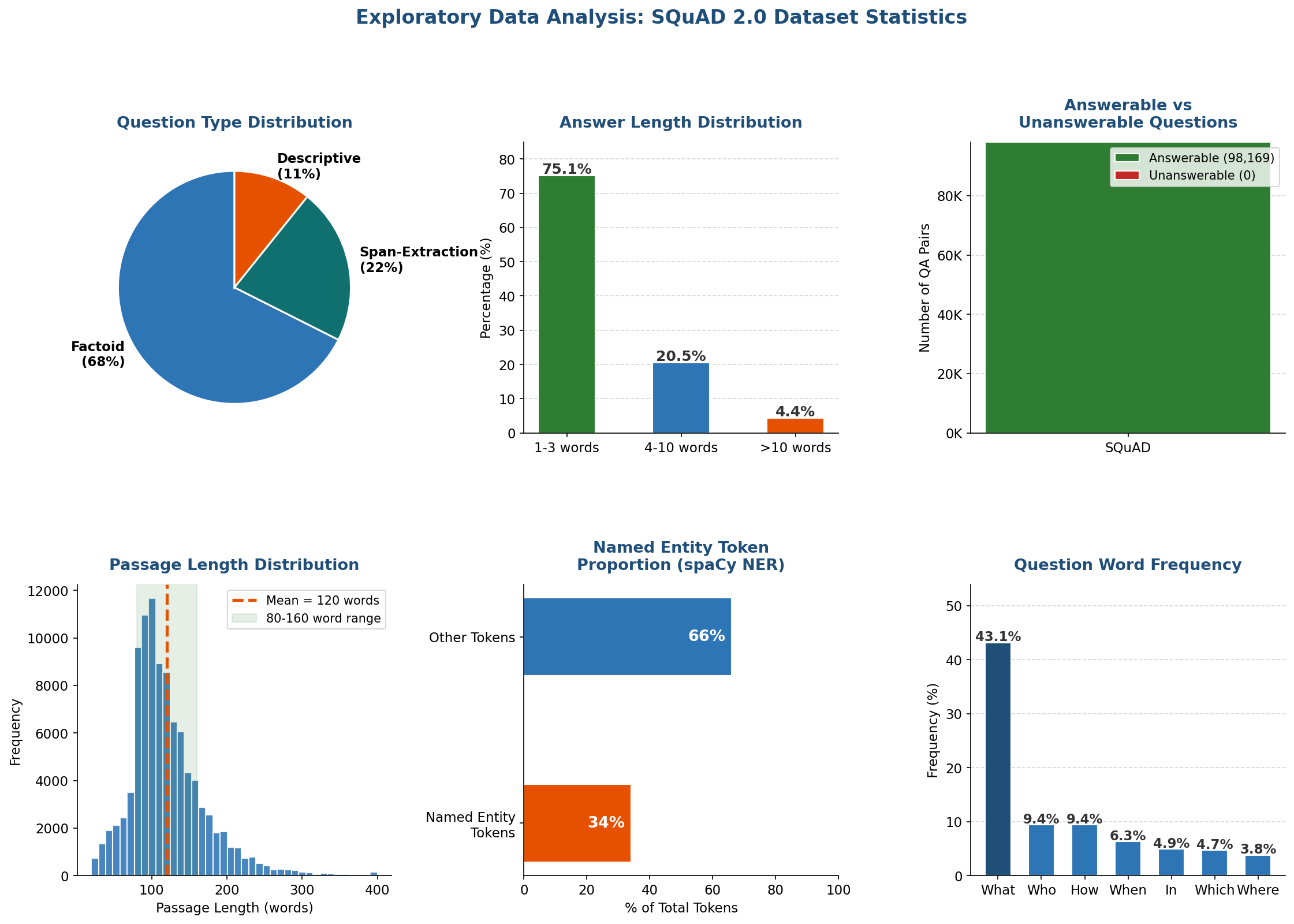
Authors
| Name | Role |
|---|---|
| Awais Asghar | RAG pipeline, FAISS indexing, LLM integration, PDF generation |
| Muhammad Haris | EDA, evaluation metrics, TF-IDF baseline, report |
Course: CS-405 Deep Learning Institution: SEECS, NUST Semester: Spring 2026
License
This project is licensed under the MIT License - see the LICENSE file for details.
More in LLMs
Related projects
 LLMs2025
AI Agents: From Idea to Deployment
A CrewAI workshop template with planning, research, writing and review agents.
- Python
- CrewAI
- LangChain
- FAISS
 LLMs2026
TechStore Chatbot
A serverless LLM chat backend for a Pakistani electronics retailer, deployed on Vercel.
- JavaScript
- Node.js
- Vercel Functions
- LLM API